.bh__table_cell { padding: 5px; background-color: #F7F3EE; }
.bh__table_cell p { color: #1A1A2E; font-family: ‘Inter’,-apple-system,BlinkMacSystemFont,Roboto,sans-serif !important; overflow-wrap: break-word; }
.bh__table_header { padding: 5px; background-color:#F7F3EE; }
.bh__table_header p { color: #1A1A2E; font-family:’Lora’,Palatino,’Book Antiqua’,Georgia,serif !important; overflow-wrap: break-word; }
Time to implement: <10 mins


Outcome from this tutorial
Stop founders and small business operators running your back office after 6pm. That is the real promise of what Anthropic shipped this week, and it is the most practical AI release I have seen for anyone running a business or a lean team.
Here is the proof before the pitch. It is one plugin with 31 ready-made skills, it runs inside 12 tools you already use, and you can have it live in a few minutes with no new software to learn.
So you get to hand off the invoice chasing, the CRM tidying, the month-end reconciliation and the pre-meeting prep. The grind that usually gets done late, by you, after everyone else has logged off.
Sign up for free below and get access to the full tutorial to save hours each week. We send similar time saving resources once per week, read in under 4 mins
Video tutorial
The problem
Every business runs on the same invisible second shift. The invoices that need chasing. The CRM that is three weeks out of date. The month that needs closing. The five leads you meant to call back. The complaint that has been sitting in the inbox since Tuesday.
None of it is hard. All of it is necessary. And almost all of it lands on the owner, after hours, because there was no room for it during the day.
The tools to fix this have technically existed for years. But the wiring was always the painful part. Zapier and Make cost real money at any volume, and the logic ends up spread across a dozen tabs. n8n is more flexible, but now you are running infrastructure. And most of these need someone technical to build and babysit them. So the second shift stayed.
What it is
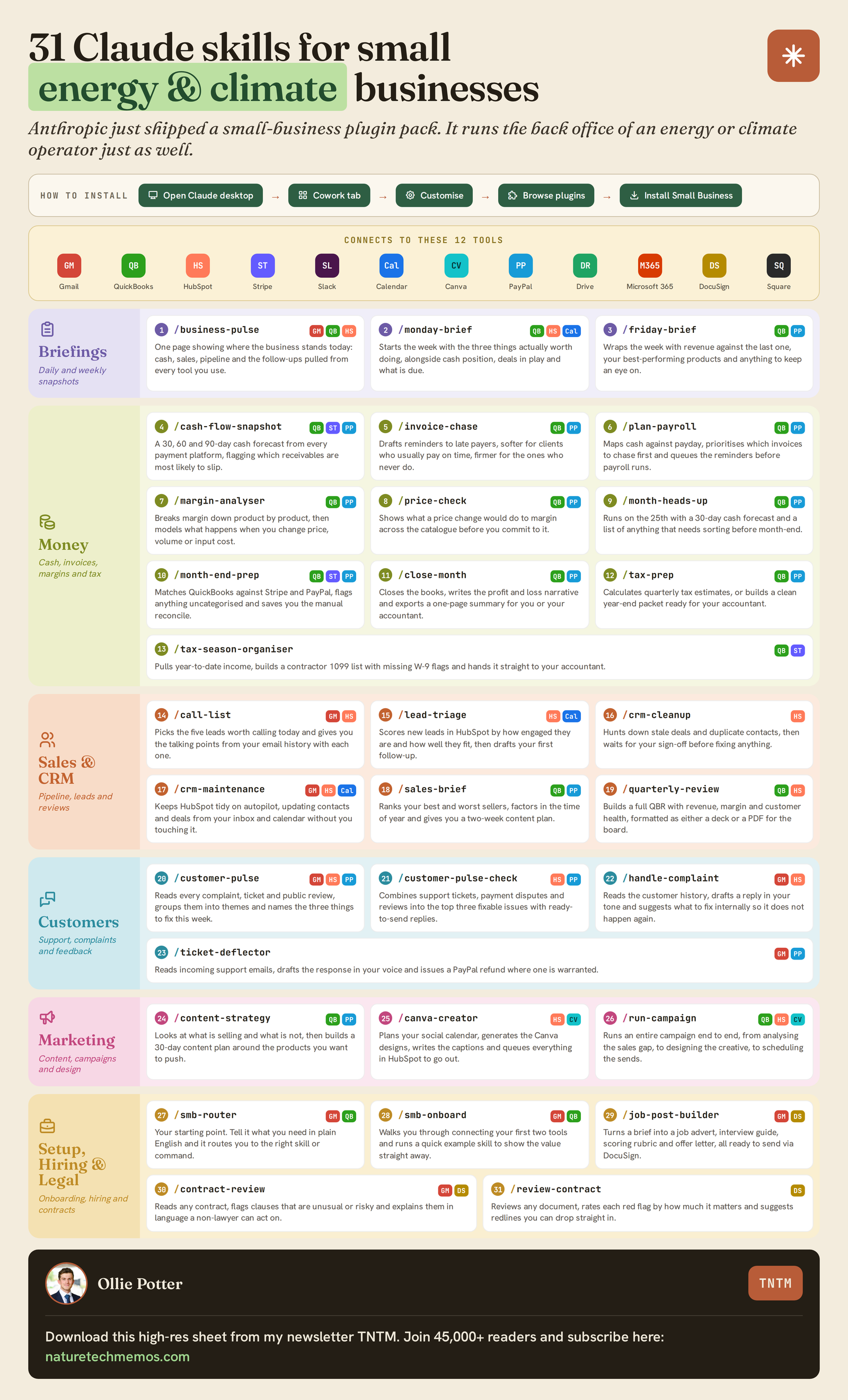
Claude for Small Business is a plugin. One toggle install that adds 31 skills to Claude, and every one of them works inside the tools you already use.
You do not learn a new app. You do not build a workflow. You type a command like /invoice-chase or /cash-flow-snapshot, Claude reads from your existing accounts, does the work, and hands you a draft to approve.
Think of it less as software and more as a back-office team that already knows your stack.
The stack
The whole point is that it meets you where your data already lives. It connects to 12 tools:
Gmail, QuickBooks, HubSpot, Stripe, Slack, Google Calendar, Canva, PayPal, Google Drive, Microsoft 365, DocuSign and Square.
You do not need all 12. Most skills need only one or two. Connect the ones you use and ignore the rest. If you are on Gmail and QuickBooks, you can run most of the briefing, money and CRM skills on day one.
How it works
Five minutes, most of it clicking auth screens.
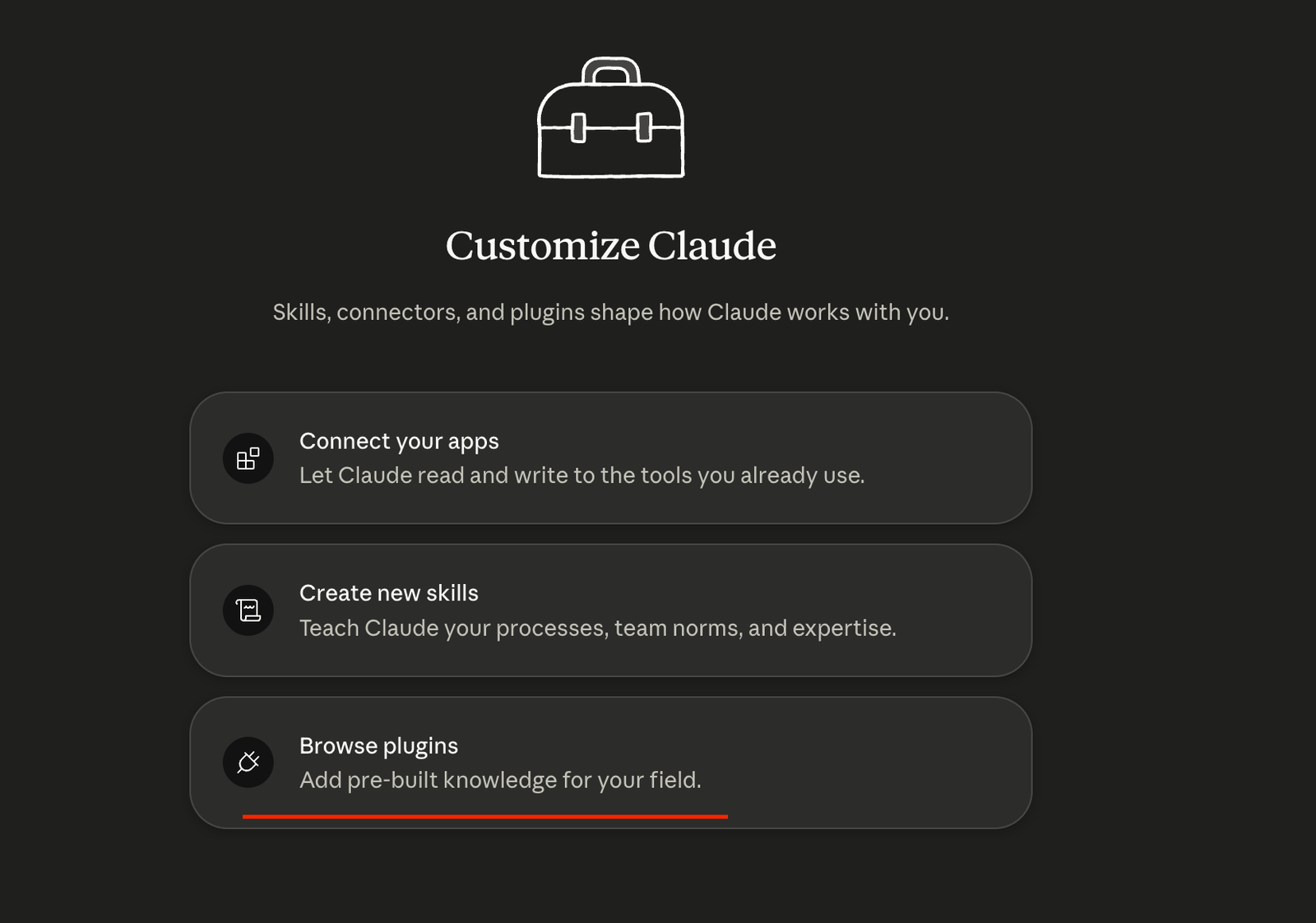
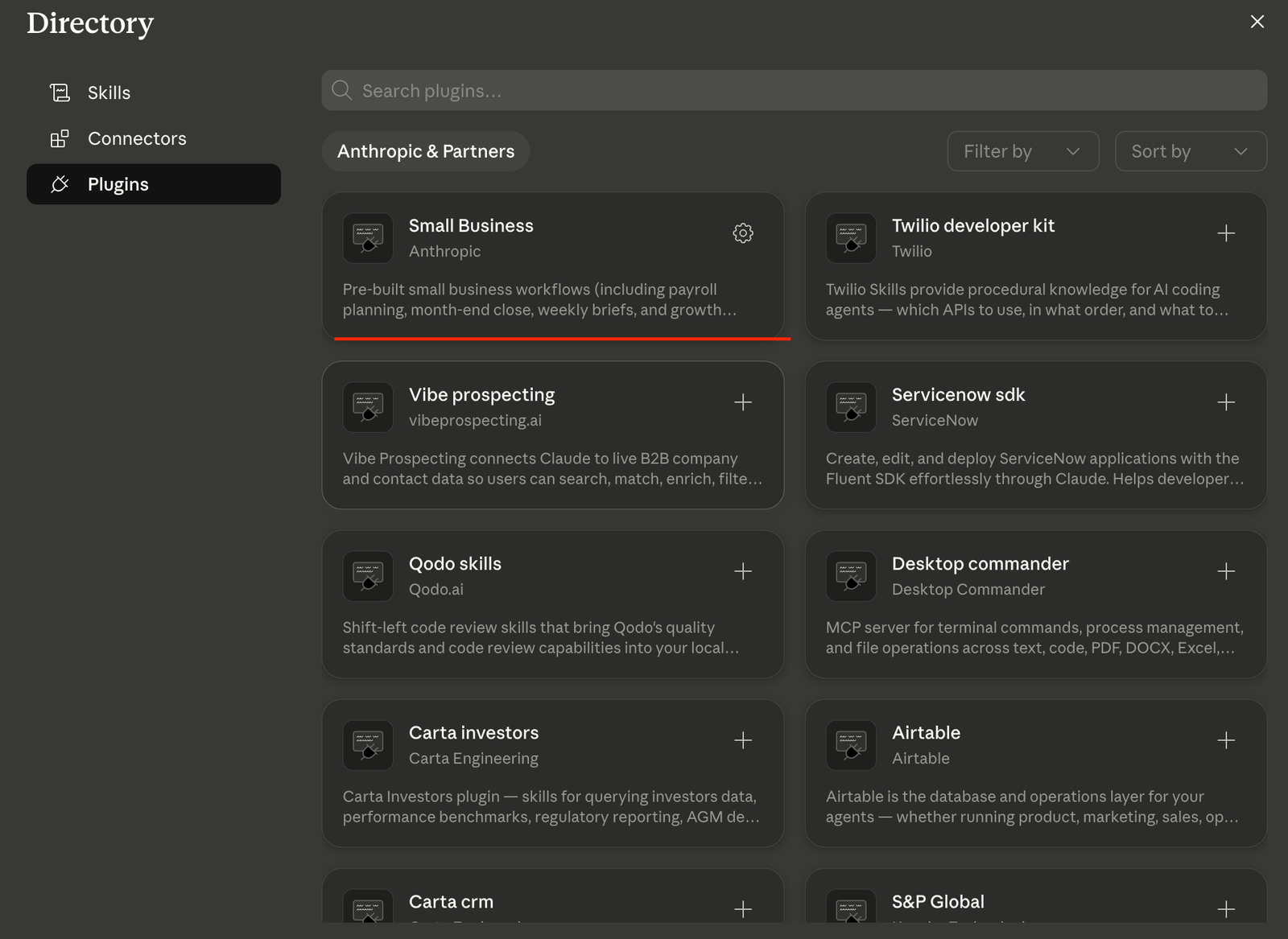
Step 1: Open the plugin. In Claude desktop, go to Customise (Top Left), then Browse Plugins, then Small Business, then Download. That is the whole install.

Step 2: Run the onboarding. Type /smb-onboard. It walks you through connecting your first two tools, runs one skill so you see value immediately, and asks a few questions about your business so every other skill has context. Two minutes.
Step 3: Connect your tools. When a skill needs an account it prompts you to connect it. Authorise once and it remembers. Do Gmail and QuickBooks first, since they unlock the most.
Step 4: Run your first real skill. Try /cash-flow-snapshot. It reads your receivables, payables and fixed costs from QuickBooks, PayPal or Stripe, then produces a 30, 60 and 90 day cash flow forecast with confidence bands and named risk flags, as a summary in chat plus a downloadable spreadsheet. The kind of job that normally eats an afternoon and a nervous spreadsheet.
Step 5: Approve, do not autopilot. Anything that leaves your business, a sent invoice reminder, a refund, a published post, waits for your yes. Claude does the assembly. You sign off. You stay in control.
The Skills you can run and what they do
2. Money and Finance: Five Workflows That Run Your Back Office
Money is where the plugin shows its highest leverage, because it’s the area where most small business owners spend the most time on tasks that have no creative content.
The five workflows in this section take that work off your plate. The default connectors are QuickBooks and PayPal. If you use a different accounting tool or payment processor (Stripe, Xero, FreshBooks) you can point the skills at those during the smb-onboard step or via the customization prompt in the final chapter.
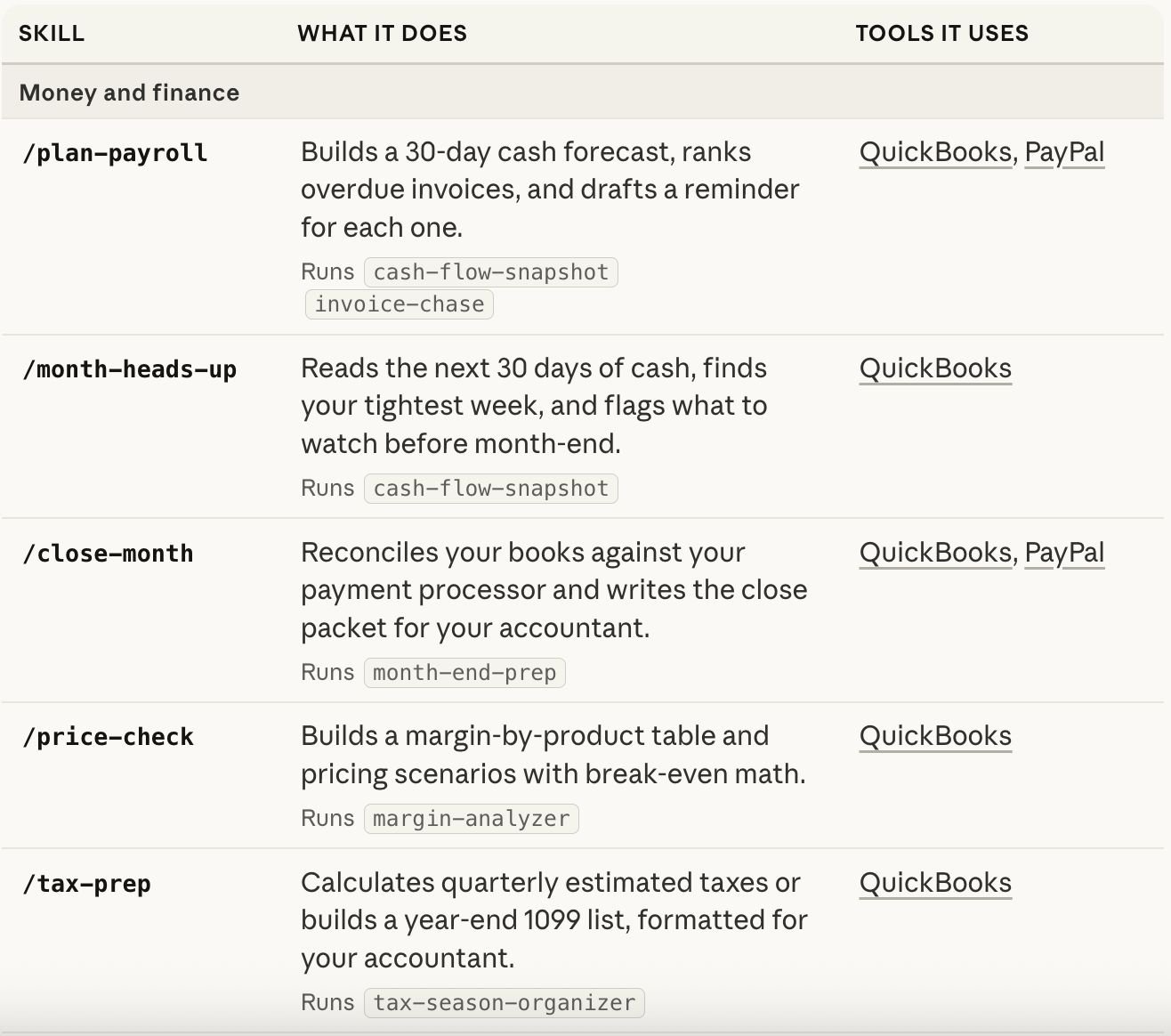
/plan-payroll: Build a 30-day cash forecast and queue invoice reminders
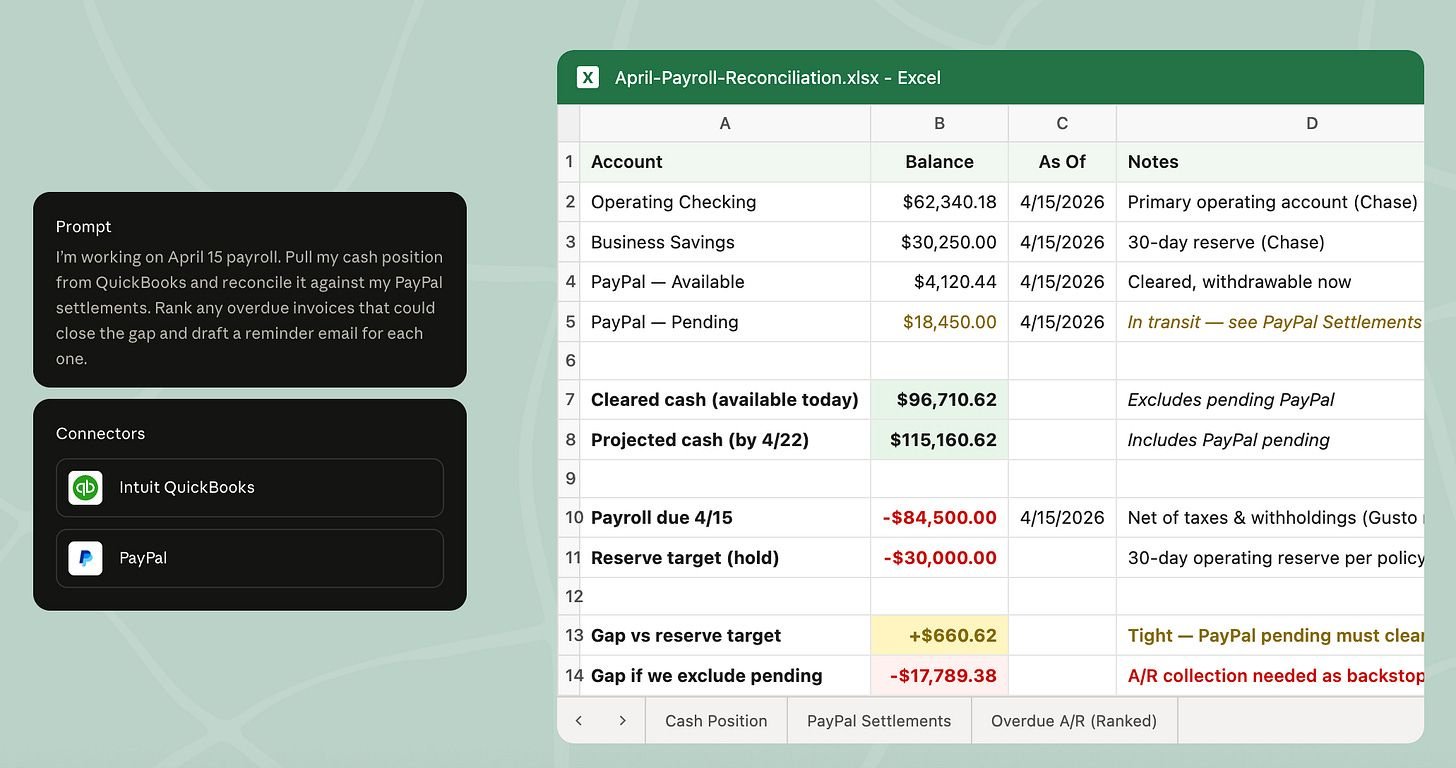
Runs cash-flow-snapshot and invoice-chase in sequence. Reads cash position from QuickBooks, reconciles against incoming PayPal settlements, builds a 30-day forecast, ranks overdue invoices, and drafts a reminder email for each one.
The output is one document with the forecast at the top, the ranked overdue list in the middle, and the drafted reminders at the bottom, each one ready for you to approve and send.
I'm working on the April 15 payroll. Pull my cash position from QuickBooks
and reconcile it against my PayPal settlements over the next 30 days. Rank
any overdue invoices that could close the gap and draft a reminder email
for each one in my voice./month-heads-up: Spot the tightest week before you hit it
Runs cash-flow-snapshot. Reads the next 30 days of cash from QuickBooks, finds the tightest week, flags what’s at risk, and tells you what to watch before month-end. Different from /plan-payroll in that it doesn’t draft anything outbound. It’s a heads-up rather than an action.
Look at the next 30 days of cash in QuickBooks. Tell me my tightest week,
what I need to watch, and any expenses I could defer if it gets close./close-month: Reconcile, flag, and write the P&L narrative
Runs month-end-prep. Reconciles QuickBooks transactions against the payment processor, flags every mismatch with the underlying reason (timing, FX, duplicate, chargeback), writes a plain-English P&L narrative, and exports a close packet you can forward to your accountant.
The output document is structured exactly like what an accountant would expect to receive, which is the part that takes most owners hours to put together by hand.
Close out March for me. Reconcile my QuickBooks transactions against
PayPal settlements, flag anything that doesn't match with the reason,
and write the P&L narrative as a document I can send straight to my
accountant./price-check: Build the margin-by-product table and run pricing scenarios
Runs margin-analyzer. Pulls revenue and cost data from QuickBooks (and PayPal for processing fees), builds a margin-by-product table, and runs pricing scenarios with the break-even math worked out. The skill shows you the numbers. You decide what to charge.
Build me a margin-by-product table for the last 6 months. Then run three
pricing scenarios on my lowest-margin product: a 5% increase, a 10%
increase, and a re-bundle with my highest-margin add-on. Show me the
break-even and the expected impact on net margin./tax-prep: Calculate quarterly estimates or build the year-end 1099 list
Runs tax-season-organizer. Calculates quarterly estimated taxes formatted for your accountant or your IRS portal, or builds the year-end 1099 list with contractor names, amounts, and the threshold check. The skill doesn’t file taxes. It produces the document your accountant uses to file them.
Get my Q2 2026 estimated taxes ready for my accountant. Pull income from
QuickBooks and PayPal, deduct estimated expenses based on Q1 patterns,
and format the result in the schedule my accountant uses.
The five underlying skills
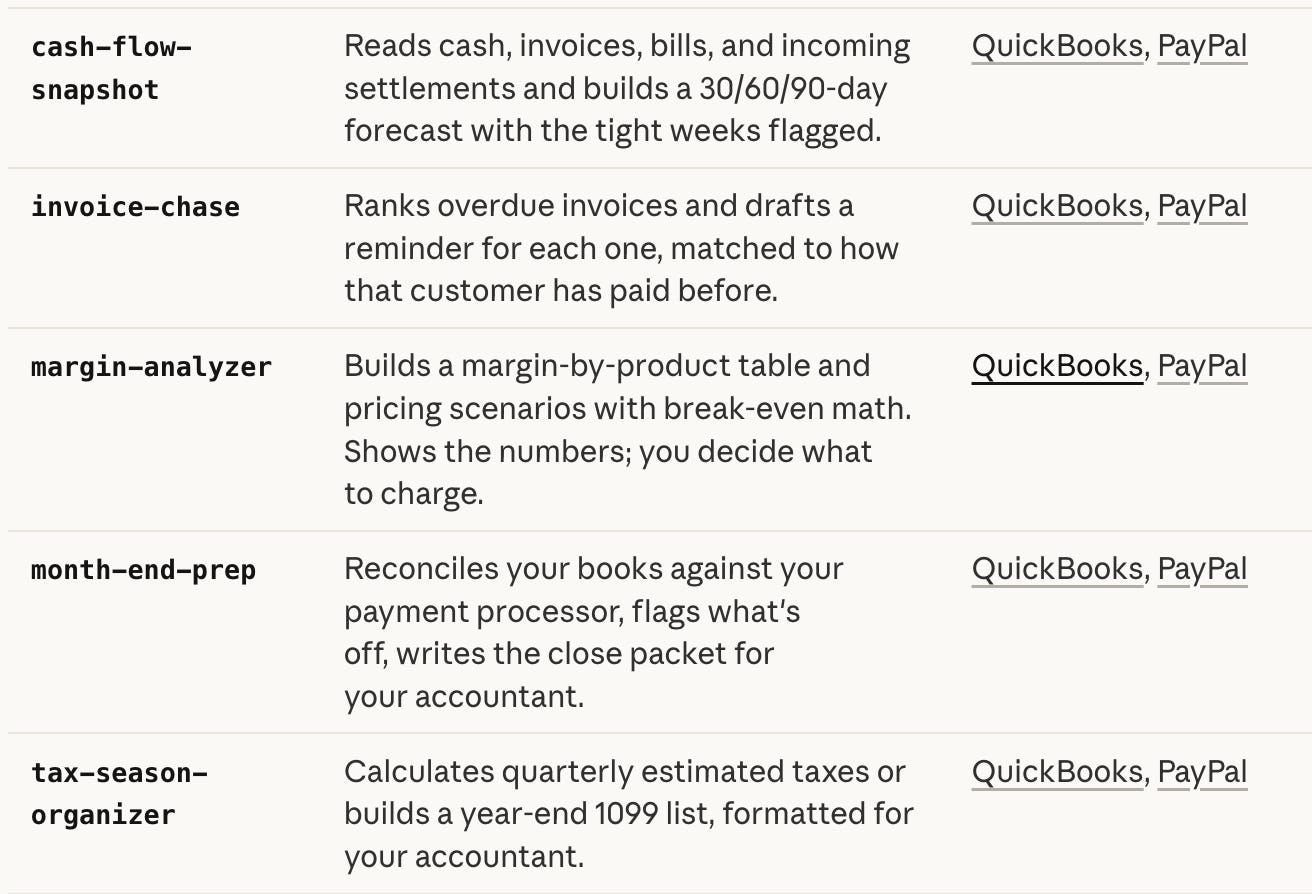
Each of the workflows above runs one or more of these atomic skills. You can also call them directly when you want a narrower slice of work:
-
cash-flow-snapshot: reads cash, invoices, bills, and incoming settlements. Builds a 30/60/90-day forecast with the tight weeks flagged. -
invoice-chase: ranks overdue invoices and drafts a reminder for each one, matched to how that customer has paid before. -
margin-analyzer: builds margin-by-product tables and pricing scenarios with break-even math. -
month-end-prep: reconciles books against the payment processor and writes the close packet. -
tax-season-organizer: calculates quarterly estimates or builds the 1099 list.
The pattern across all of them is the same: read the data, do the work, show you the result, wait for your approval before anything leaves your computer. The big decisions (what to charge, what to file, what to remind, what to defer) stay with you. The clerical work that builds the artifacts on which those decisions get made stops being your job.
This is the full list:
3. Sales, Marketing, and Customer Ops: Seven Workflows for the Front Line
The seven workflows in this chapter live across HubSpot, Canva, Gmail, and the payment processor. They cover the four most expensive things to do badly at a small business: which lead to call first, which campaign to run, how to handle a complaint, and what your contracts actually say.
The default CRM is HubSpot. The default email is Gmail. The default design tool is Canva. If you use Salesforce, Pipedrive, Microsoft 365, or any other tool in those categories, point the skills at them during setup.
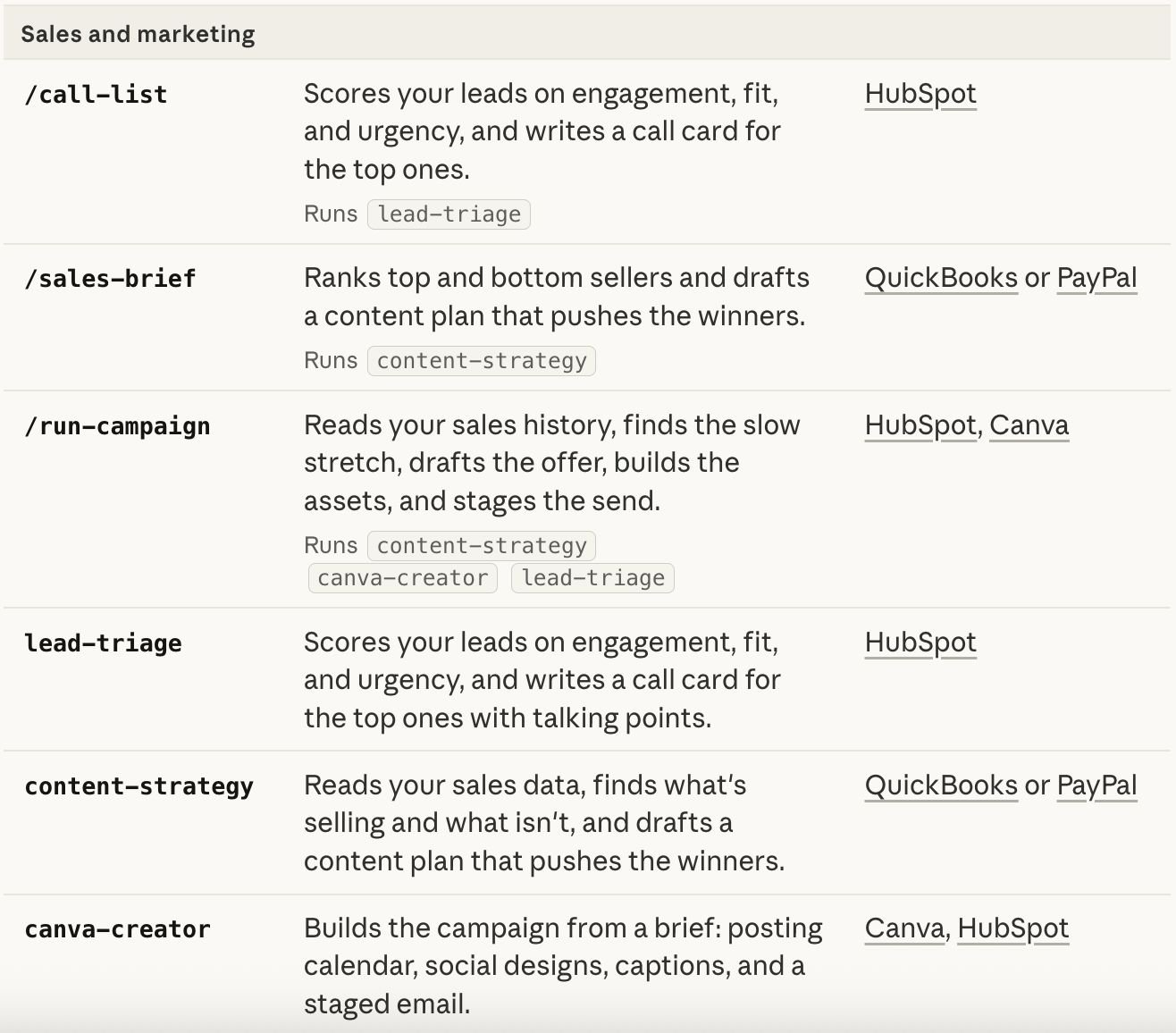
/call-list: Score leads and write the call card for the top ones
Runs lead-triage. Reads your HubSpot leads, scores each on engagement (opens, clicks, replies), fit (firmographics against your ICP), and urgency (deal stage, last activity), then writes a one-page call card for the top three to five. The card includes the talking points based on what they’ve engaged with and the questions they haven’t had answered yet.
Score the leads in my HubSpot pipeline. Tell me who I should call first
today, and write the call card for the top 5. Include talking points
based on what each lead has engaged with and the specific question
that's still open with them./sales-brief: Find what’s selling and plan the content that pushes it
Runs content-strategy. Reads sales data from QuickBooks or PayPal, identifies what’s selling and what isn’t, and drafts a content plan that pushes the winners. The output is a calendar of suggested content (posts, emails, landing pages) tied to the products that are actually moving.
Look at the last 90 days of sales from QuickBooks. Identify my top 3
sellers and my biggest underperformer. Draft a content plan for the
next 30 days that leans into the top 3, with a posting calendar and
suggested formats for each./run-campaign: Find the slow stretch, plan the promo, stage the send
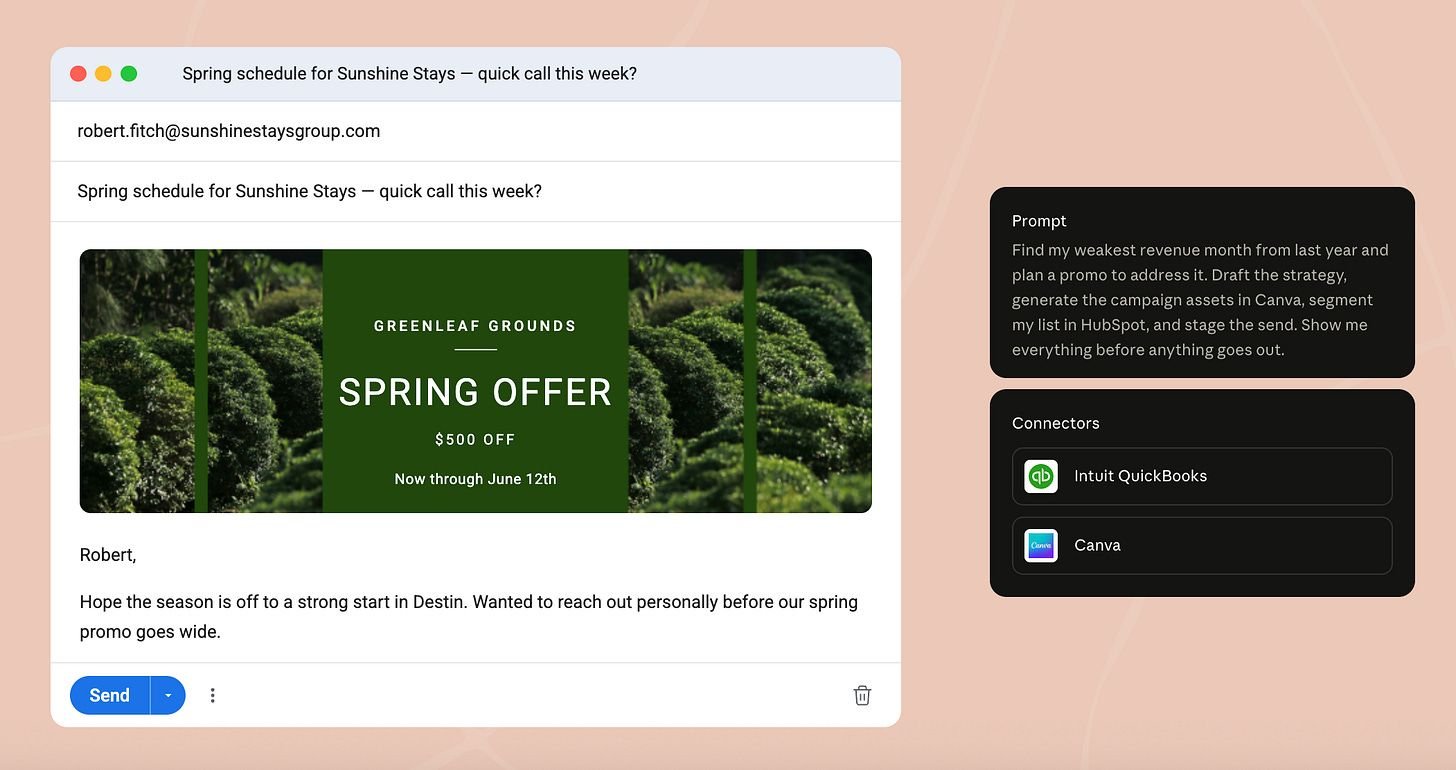
Runs content-strategy, canva-creator, and lead-triage in sequence. Reads your sales history, finds the slow stretch in your revenue, drafts the promotional strategy, generates the campaign assets in Canva, segments your list in HubSpot, and stages the send. Nothing goes out until you approve.
Find my weakest revenue month from last year and plan a promo to
address it. Draft the strategy, generate the campaign assets in Canva,
segment my list in HubSpot, and stage the send. Show me everything
before anything goes out./handle-complaint: Read the email, pull the order history, draft the reply
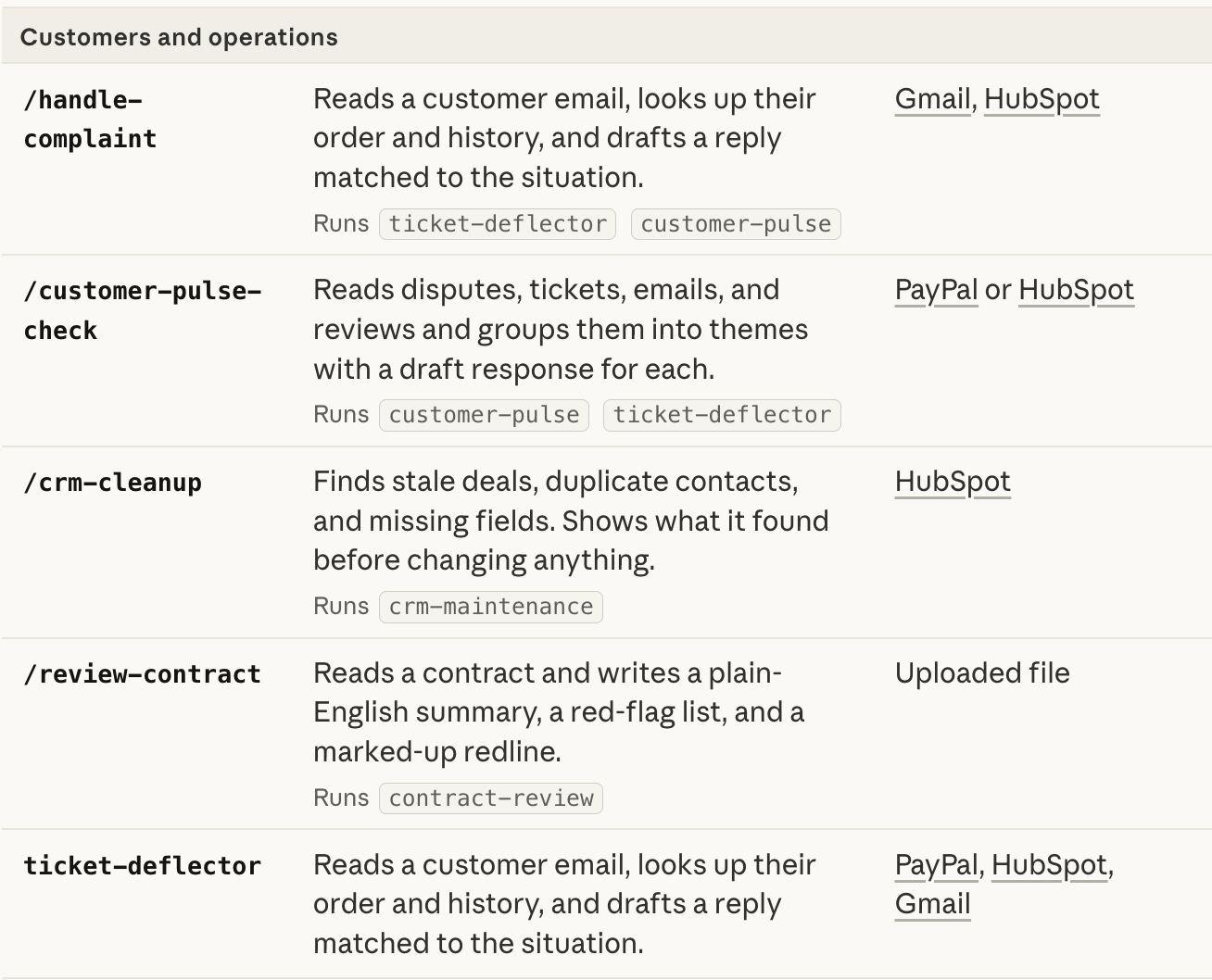
Runs ticket-deflector and customer-pulse. Reads a customer email from Gmail, looks up the order and history in HubSpot and PayPal, and drafts a reply matched to the specific situation. The skill knows the difference between a first-time complaint and the third one from the same customer. The reply takes that into account.
A customer just emailed about a late shipment. Look up their order
history in HubSpot and their payment record in PayPal. Draft a reply
in my voice that addresses the specific situation, not a generic apology./customer-pulse-check: Group the feedback into themes with draft responses
Runs customer-pulse and ticket-deflector. Reads disputes from PayPal, tickets from HubSpot, emails from Gmail, and reviews from any review channel you’ve connected. Groups the messages by recurring theme, ranks the themes by frequency and recency, and drafts a response for each theme. The output is the artifact most founders never produce: a quarterly view of what customers are actually saying, with the fixable patterns ranked at the top.
Read the last 60 days of customer messages across PayPal disputes,
HubSpot tickets, and my Gmail support inbox. Group them into themes,
rank the themes by how often they come up and how recent they are,
and draft a response template for each theme./crm-cleanup: Find stale deals, duplicates, and missing fields
Runs crm-maintenance. Scans HubSpot for stale deals that haven’t moved, duplicate contacts, and missing fields on important records. The skill shows you what it found before changing anything. You approve the cleanups individually or in batches.
Run a cleanup pass on my HubSpot CRM. Find stale deals that haven't
moved in 30+ days, duplicate contacts, and important records with
missing fields. Show me what you found before changing anything./review-contract: Plain-English summary, red-flag list, marked-up redline
Runs contract-review. Reads a contract you’ve uploaded (or sent via Docusign), writes a plain-English summary of what it actually says, flags the clauses that should give you pause, and produces a marked-up redline with proposed edits. The skill doesn’t replace your lawyer. It gets you to the lawyer with the right questions already framed.
Walk me through this NDA before I sign it. Read the attached document,
give me a plain-English summary, list the clauses that are unusual or
risky, and produce a redline with what I should ask my lawyer to change.
The seven underlying skills
-
lead-triage: scores leads on engagement, fit, and urgency. Writes call cards for the top ones. -
content-strategy: reads sales data, finds what’s working, drafts a content plan that pushes it. -
canva-creator: builds the campaign from a brief: posting calendar, social designs, captions, staged email. -
ticket-deflector: reads a customer email, looks up the order, drafts a reply matched to the situation. -
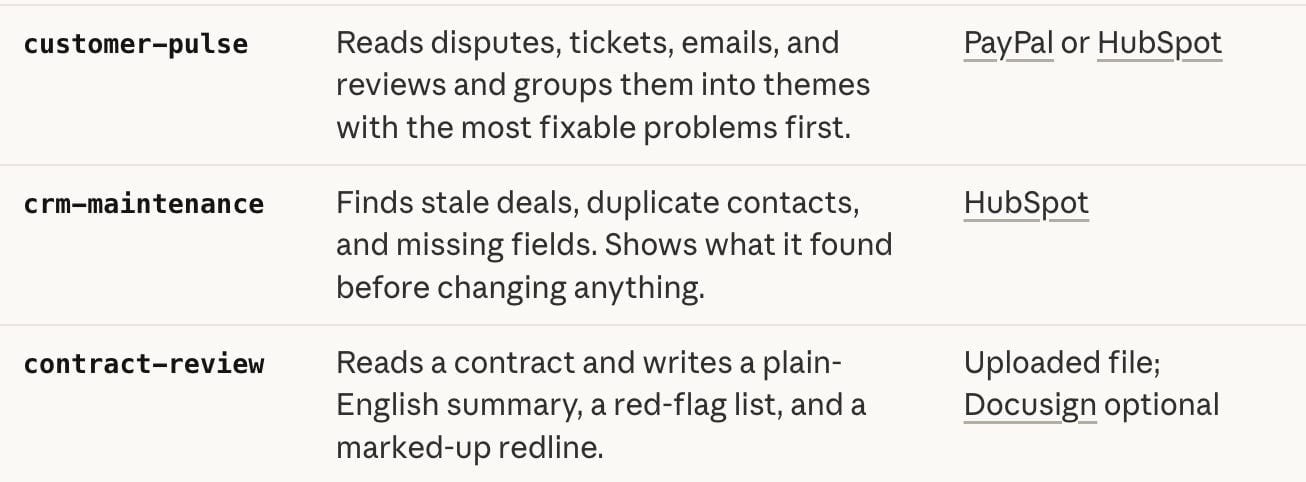
customer-pulse: reads disputes, tickets, emails, and reviews. Groups them into themes with the most fixable problems ranked first. -
crm-maintenance: finds stale deals, duplicates, missing fields. Shows what it found before changing anything. -
contract-review: reads a contract, writes a summary, lists red flags, produces a redline.
This is the full list:
4. Business Intelligence and Hiring: Six Skills That Sit Above the Day-to-Day
The first three chapters cover the work that happens at the workflow level: a payroll, a campaign, a complaint, a contract. The skills in this chapter sit one level up.
They don’t run a specific task. They produce the artifact you read to know whether the tasks are adding up the right way.
There are three briefs (Monday, Friday, quarterly), one underlying business-pulse skill, and two skills for the work that happens when you bring someone new into the team.
/monday-brief: One page to start the week
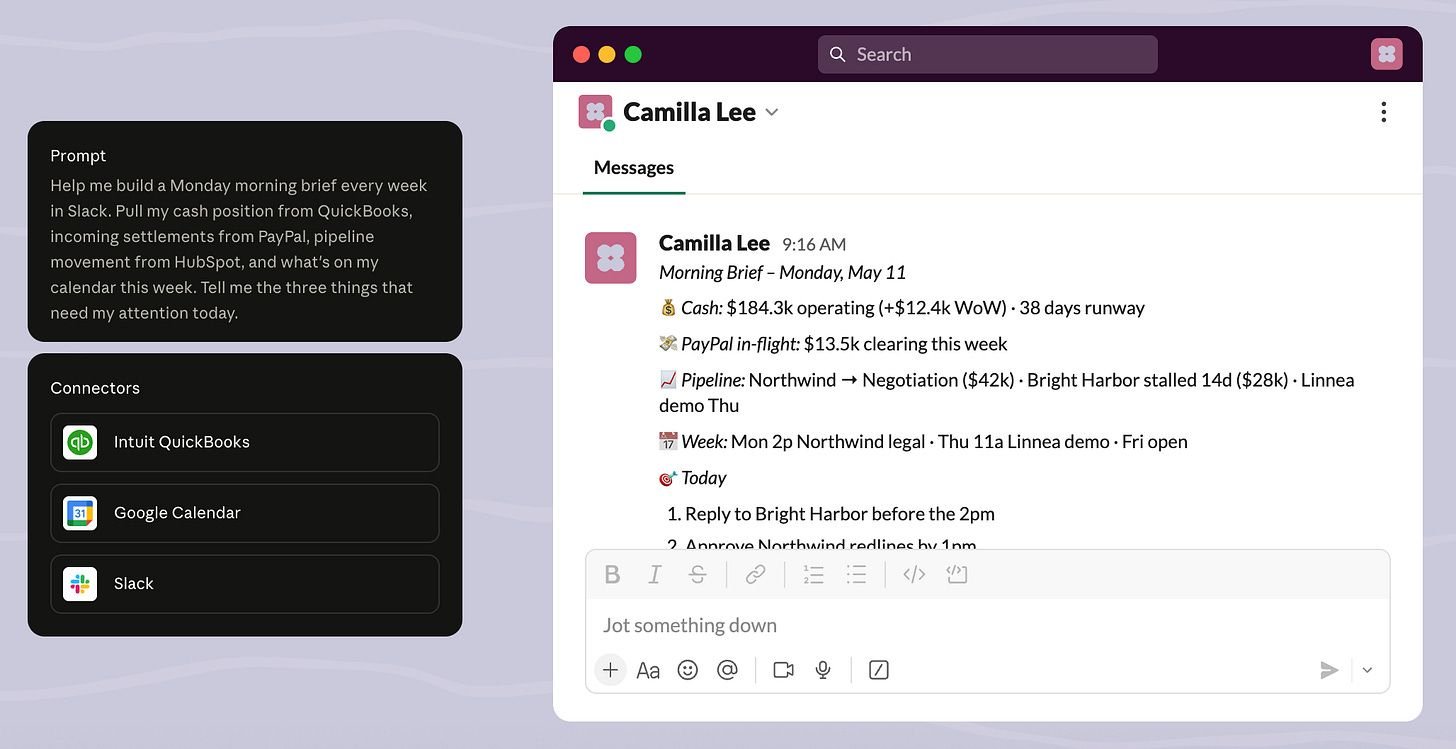
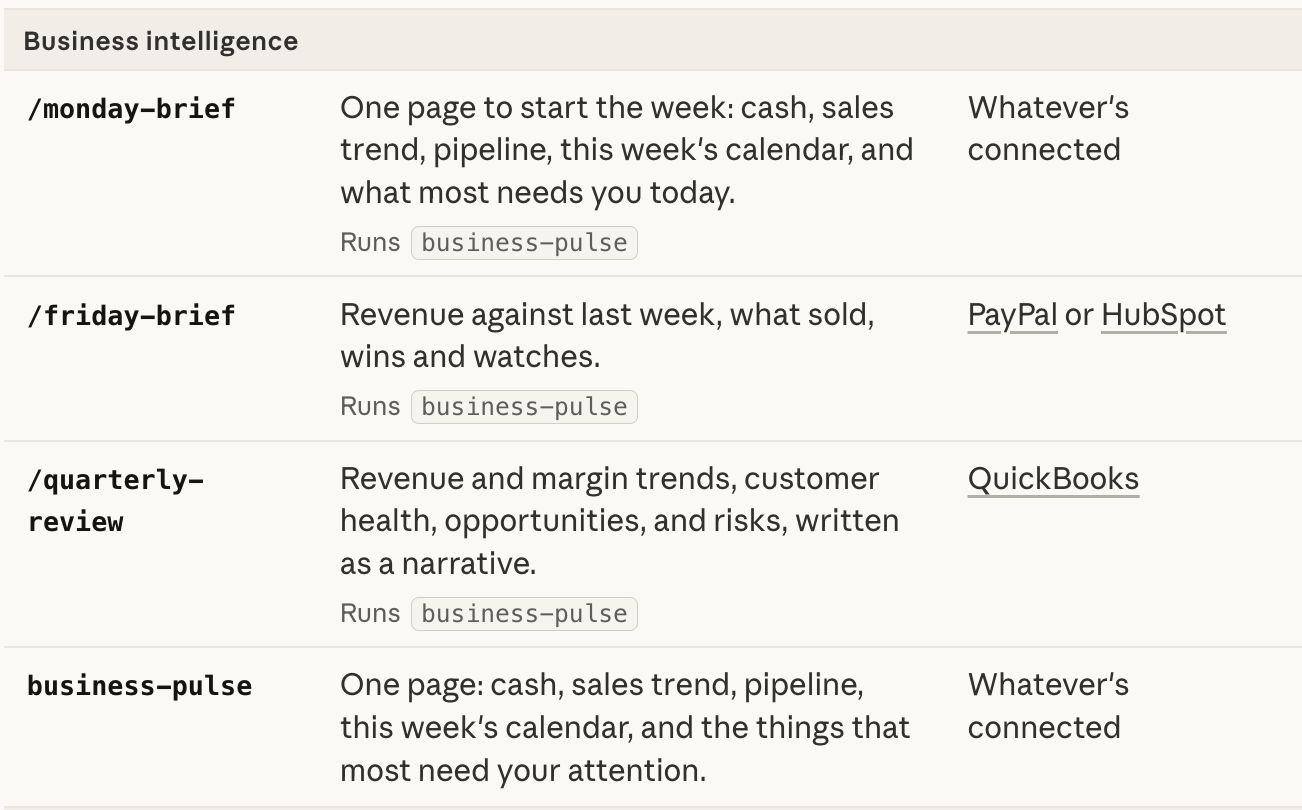
Runs business-pulse. Pulls cash from QuickBooks, sales trend from PayPal or HubSpot, pipeline movement from HubSpot, this week’s calendar from Google Calendar, and synthesizes the three things that need your attention today.
Build me a Monday morning brief. Pull cash from QuickBooks, incoming
settlements from PayPal, pipeline movement from HubSpot, and what's
on my calendar this week. Tell me the three things that need my
attention today./friday-brief: Did the week go where I thought it would?
Runs business-pulse. Compares this week’s revenue to last week, lists what sold, highlights wins, and flags items to watch into next week. Shorter than the Monday brief, focused on the closing arc of the week rather than the planning arc.
Give me my Friday brief. Compare this week's revenue against last week,
list what sold, flag the wins to keep pushing and the watches I should
not forget by Monday./quarterly-review: The narrative version of the numbers
Runs business-pulse. Reads the last 90 days of revenue, margin, customer health, pipeline, and writes a quarterly narrative. The output reads like the document you’d produce for an advisor or a board, except it takes 30 seconds instead of a Sunday afternoon.
Write my Q1 2026 quarterly review. Pull revenue and margin trends from
QuickBooks, customer health from HubSpot, and any major operational
shifts I've recorded. Write it as a narrative I could send to my
advisor, not as a slide deck.business-pulse: The atomic skill behind the three briefs
Called directly when you want a specific slice that doesn’t fit the Monday, Friday, or quarterly cadence. The morning of a board call, the day before a big customer demo, the week you’re considering a hire.
Run business-pulse for me right now. I have a board call in 2 hours
and need to know: where's cash, what closed this week, what's stuck
in the pipeline, and which customer health signals have shifted in
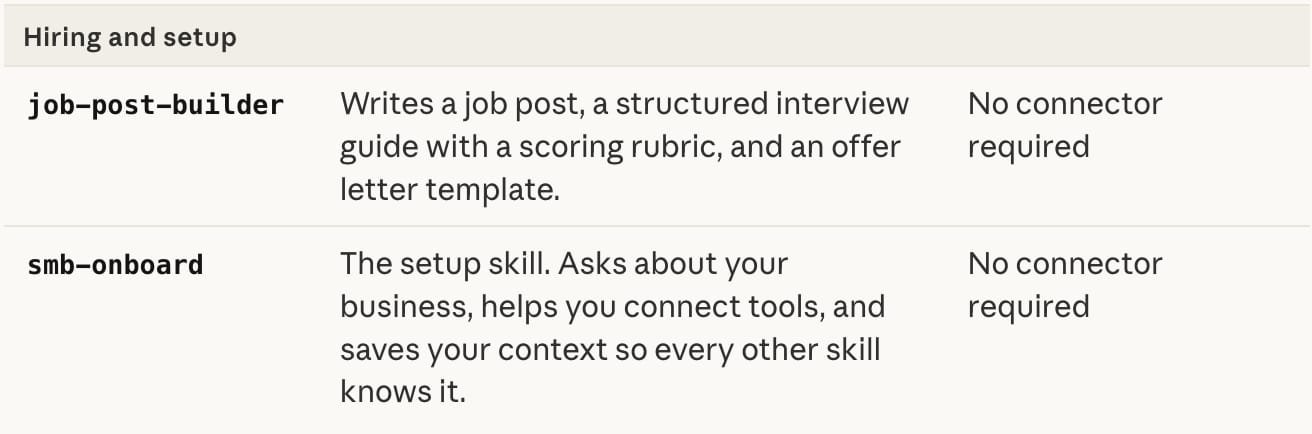
the last 30 days.job-post-builder: Job post, interview guide, offer letter template
The hiring side of the plugin. Writes a job post tuned to the role you describe, builds a structured interview guide with a scoring rubric, and drafts an offer letter template you can adapt. The skill doesn’t require any connector to run because the inputs are descriptive.
Help me hire a part-time bookkeeper. The role is 15 hours a week,
fully remote, US-based. Write the job post, build the interview guide
with scoring rubric, and draft the offer letter template I can adapt.smb-onboard: The setup skill that runs once and shapes everything
The skill you ran in the install chapter when you typed “get me started.” It asks about your business and saves the context every other skill reads from. Re-runnable any time the business changes: new product line, new market, new co-founder, new accountant.
Update my business context. I just launched a second product line in
the catering category. Re-interview me on what's changed, and tell
me which skills should be updated to reflect the new context.
This is the full list:
5. Three Combined Workflows That Change Your Week

The chapters above cover every skill as an individual unit. In practice, the highest leverage comes from running two or three of them in sequence, on a fixed cadence, tied to a specific moment in your week.
Workflow 1: Monday Cockpit
Open Cowork. Run this:
Run my Monday cockpit.

Step 1: pull my Monday brief. Cash from QuickBooks, settlements from
PayPal, pipeline from HubSpot, calendar from Google Calendar. Tell me
the three things that need my attention today.

Step 2: after the brief, score the leads in my HubSpot pipeline and
write the call card for the top 3. Use the engagement data from the
last 7 days. Each call card should reference the specific item in
their history I should mention on the call.

Show me both as one document.
What you get back is the page you used to spend 90 minutes assembling: the week in front of you, in priority order, with the three highest-leverage outbound moves already drafted.
Workflow 2: Cash + Collections Friday
Run my cash and collections close.

Step 1: pull the 30-day cash forecast from QuickBooks and tell me my
tightest upcoming week. Flag what I should watch.

Step 2: identify every overdue invoice and rank them by amount and
how late they are. For each one in the top 5, draft a reminder email
in my voice, matched to how that customer has historically responded
to reminders. Don't send anything: stage the drafts for me to review.

Show me the forecast, the ranking, and the drafted emails as one
document.
What you get back closes the week with two things resolved that most owners never close: you know where cash will be in 30 days, and the collection emails are written. You approve the reminders before you log off Friday. By Monday they’re already in your customers’ inboxes.
Workflow 3: Quarterly Pivot
Run my quarterly pivot.

Step 1: write my quarterly review for the quarter that just ended.
Pull revenue and margin trends from QuickBooks, customer health from
HubSpot, and any operational shifts I've noted in my context. Write
it as a narrative I could send to my advisor.

Step 2: based on the review, identify the weakest month or stretch
that I should address in the new quarter. Then plan a campaign to
address it: draft the strategy, generate the assets in Canva, segment
the relevant audience in HubSpot, and stage the send. Show me
everything before anything goes out.

Show me the review and the campaign plan as one document.
What you get back is the strategic loop most small businesses never close: you read what the quarter actually was, you identify the soft spot, and the response is already half-built. It’s the workflow that turns the plugin from a back-office automation into something closer to a co-founder.
6. How to Customize the Plugin So It Knows Your Business
The skills ship with defaults written for a typical small business. However, a typical small business doesn’t exist.
The customization is what closes the gap between the generic plugin and a plugin that works the way you work. There are three places it happens.
1. The initial setup interview
You ran this in the install chapter when you typed “get me started.” The smb-onboard skill interviewed you about your business and saved the answers as context.
The two questions most founders skip on the first pass, and most regret skipping: “what’s hardest right now” and “what are my priorities this quarter.” The answers to those reshape every skill output because they tell the agent what to weight when it surfaces patterns or ranks options.
2. The customization prompt
For deeper rewrites of how the skills behave, run this directly in Cowork:
Customize the "smb-complete" plugin for me based on my company.This triggers a more thorough interview than the initial onboarding. Claude asks about your industry specifics, your team structure, the way you like outputs formatted (long-form narratives vs. bullet summaries, attached docs vs. inline tables), and the conventions of your business (fiscal year start, your preferred currency, regional tax rules, the names of your sales pipeline stages, your common product categories).
You can also customize a single skill rather than the whole plugin. If, for example, you want the /handle-complaint skill to always reference your specific refund policy and your specific shipping carrier, tell Claude:
Customize the handle-complaint skill. My refund policy is [policy].
My shipping carrier is [carrier] and the typical resolution time
is [time]. From now on, every draft reply should reflect these facts
and offer the right next step based on the situation.
3. The running update
The most underused customization path is the in-flow one. Every time you run a skill and the output isn’t quite what you wanted, you can tell Claude to save the preference, and the change persists for next time.
The pattern:
This Monday brief is good but I don't care about pipeline movement,
I care about which customers haven't responded in the last 14 days.
Save that as a permanent change to /monday-brief for me.
Or:
The reminder emails are too formal. Rewrite them in a more direct,
founder-to-customer voice with less of the "Dear Mr. Smith" energy,
and save that as the new default for /plan-payroll going forward.
This is how the plugin compounds. Run a skill, read the output, tell Claude what to change, and over time the defaults converge to how you actually like things done.
Hope this was valuable!

Whenever you're ready, there are 2 ways we can help you:
1. Save hours each week with AI
In our day jobs, we help Energy, Industrial and Natural Capital business owners and investors use AI to:
A) Choose the right products, services and geographies to compete in
B) Build the commercial systems – pricing, go-to-market, operations to win in those markets
Want to chat? Book a call
2. Partnerships
We have a growing audience of 45,000+ Investors, Business Owners and Executives across Energy and Natural Resources and ClimateTech. Apply to feature your business in front of our readers Drop us an email.
📩 Written by Ollie. Feel free to send us deals, announcements, or anything else using the link below or via LinkedIn.